Google Workspace Upgrade Can Break Gemini AI Access
A real-world WordPress Gemini AI experience shows how a Google Workspace upgrade can affect AI API access, why paid chat subscriptions are different from developer access, and how to avoid unexpected disruptions.
MATHURA: Part 1 of this story explained how a custom Gemini AI feature can be built inside WordPress — in simple terms, using one small plugin file, a secure API key and a few carefully designed requests to Google’s AI.
Part 2 looks at a real problem that can be far more frustrating than the coding itself. This is not a hypothetical situation. It is a real-world experience of what can happen when Google account settings, Workspace and Gemini API access become connected.
Also Read: Braj Raj Utsav 2026: 11-Day Cultural Fair Set for Mathura and Vrindavan
The Trap: Free Access Disappears After an Account Upgrade
Google’s Gemini AI can provide free API access for eligible personal Google accounts. For a small website, that can be enough to experiment with AI-assisted tasks such as generating article drafts.
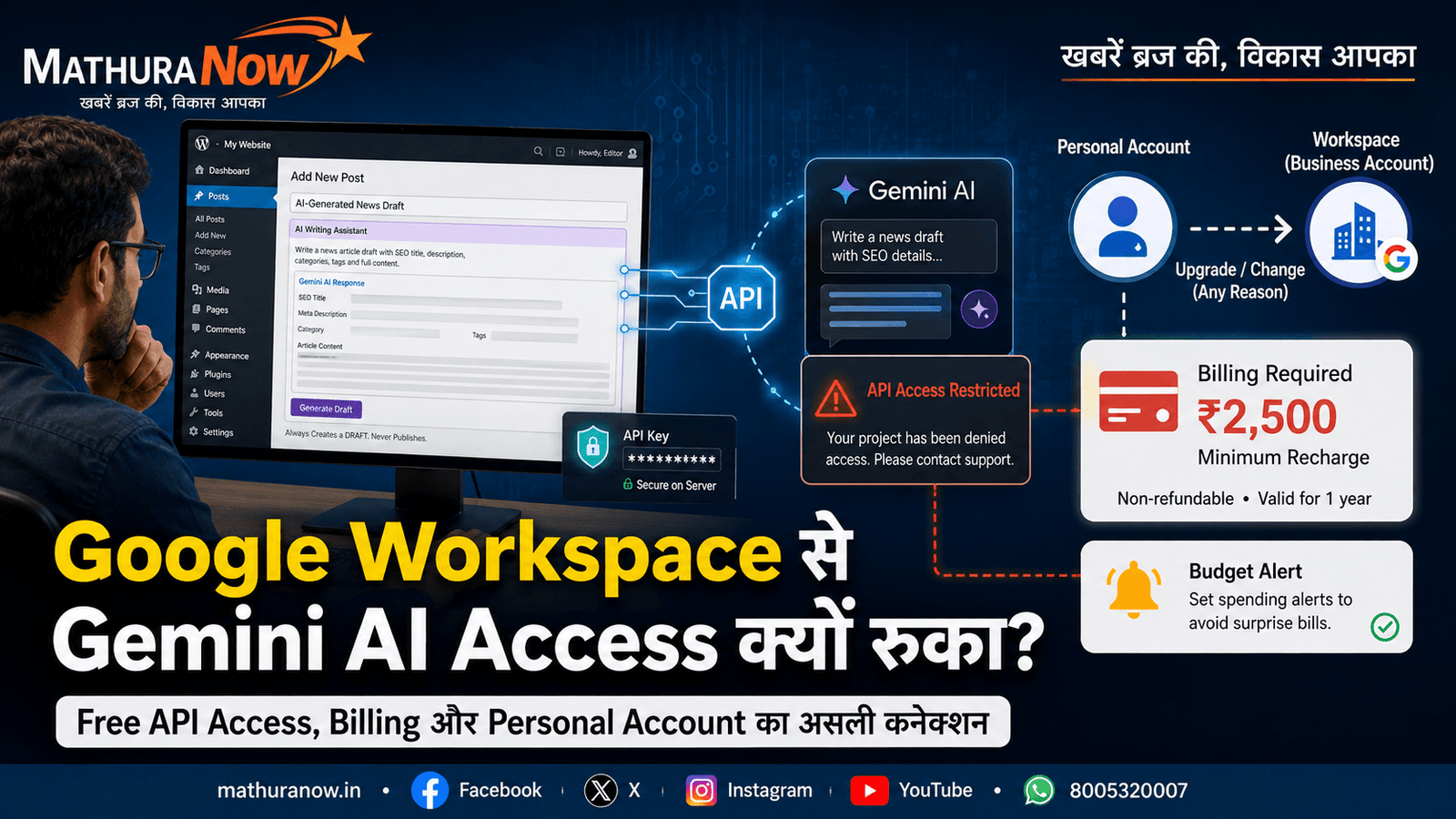
The trouble can begin when the Google account associated with the API access is later changed through a Google Workspace upgrade.
In this case, the Workspace upgrade was made for a completely different business purpose — custom-domain email and other Workspace services on another website. The Google account behind the AI access was consequently no longer being treated like an ordinary personal account for the API access being used.
After the change, Gemini API requests began failing with an access-related message:
Your project has been denied access. Please contact support.
The message itself does not clearly explain what has changed. That can lead to hours of checking the API key, model name, project settings and usage limits.
The important lesson from this experience was that the problem was related to the account and project’s access and billing status rather than the WordPress code itself.
Why Billing Became the Real Issue
When API access becomes restricted, the solution may involve enabling billing for the Google Cloud project. This is different from simply having a consumer-facing Gemini subscription.
In this case, the account settings indicated that API access was restricted and that billing needed to be configured to continue using the service.
That distinction is important because a paid AI subscription and developer API access are two different things. Paying for a consumer AI plan does not automatically mean that API usage for a website is included.
What WordPress Users Should Learn From This
- Keep AI API accounts separate: A dedicated Google account for website AI tools can reduce the risk of unrelated account changes affecting an existing system.
- Be careful with Workspace upgrades: Before converting or associating an account with Google Workspace, check which AI and Cloud services depend on that account.
- Check existing billing: If the Google Cloud account already has billing configured for another service, understand how that billing relationship affects the project you are using for Gemini API access.
- Use budget alerts: Google Cloud provides budget and spending-alert options that can help website owners monitor API-related costs.
The broader lesson is simple: do not wait for an AI feature to stop working before thinking about its billing and account architecture.
What If You Do Not Want to Pay?
If the AI feature is only an experiment or the website does not use it heavily enough to justify API costs, there is no reason to delete the entire system.
A better approach is to build the feature with a clear on/off control. The AI function can be disabled when access is unavailable, while the rest of the WordPress system continues working normally.
The code and previously created drafts can remain in place. The feature can then be enabled again if the owner later decides that paid API access is worthwhile.
What About Claude AI?
This naturally raises another question: could Claude AI be used instead?
Also Read: Shiv-Parvati Vivah Enacted at Shri Krishna Janmabhoomi – Mathura Ram Leela Mahotsav 2026
The same basic distinction exists there too. A consumer-facing Claude subscription is designed for using Claude directly. It should not automatically be treated as developer API access for powering a WordPress feature.
Developer access is handled separately and is generally based on API usage rather than simply having a consumer chat subscription.
The same principle applies across major AI services. Buying Gemini Pro, ChatGPT Plus or Claude Pro does not automatically mean that the subscription includes unlimited or bundled API access for custom website tools.
Where Claude Code Can Help
Claude Code is a different kind of tool. Its value in this project was not as the API running the WordPress AI feature, but as a development assistant.
It can help developers work with existing website files, write code, test changes and troubleshoot problems. In this case, that kind of development assistance was useful while building and fixing the WordPress-Gemini system described in Part 1.
The important distinction is that one AI tool can help build an AI feature while another AI service actually powers that feature.
The Takeaway
Adding a genuine AI feature to WordPress is no longer something limited to large technology teams. Automatic article drafting, SEO assistance and branding of real uploaded photographs can all be built into a website with appropriate safeguards.
But the technology should always operate under clear editorial rules: AI creates drafts, humans verify them, humans publish them, and real photographs should remain real.
The biggest lesson from this experience is not about coding. It is about understanding the difference between AI chat subscriptions, developer API access, Google accounts, Workspace accounts and Cloud billing.
If a WordPress AI feature is important to your workflow, keep the account behind its API access carefully separated from unrelated account changes. Understand the billing requirements before the feature becomes business-critical.
That small amount of planning can prevent an otherwise working AI system from suddenly going silent in the middle of an important publishing workflow.

News Desk
Editor
MathuraNow News Desk is the official editorial team of MathuraNow, covering hyperlocal news, Braj culture, temple affairs, civic developments, spirituality, festivals, public…
Get Mathura's latest news on WhatsApp
Breaking news and important local updates, straight to your phone
Join channel