


I Built a Full-Featured WordPress News Theme From Scratch in 2 Hours
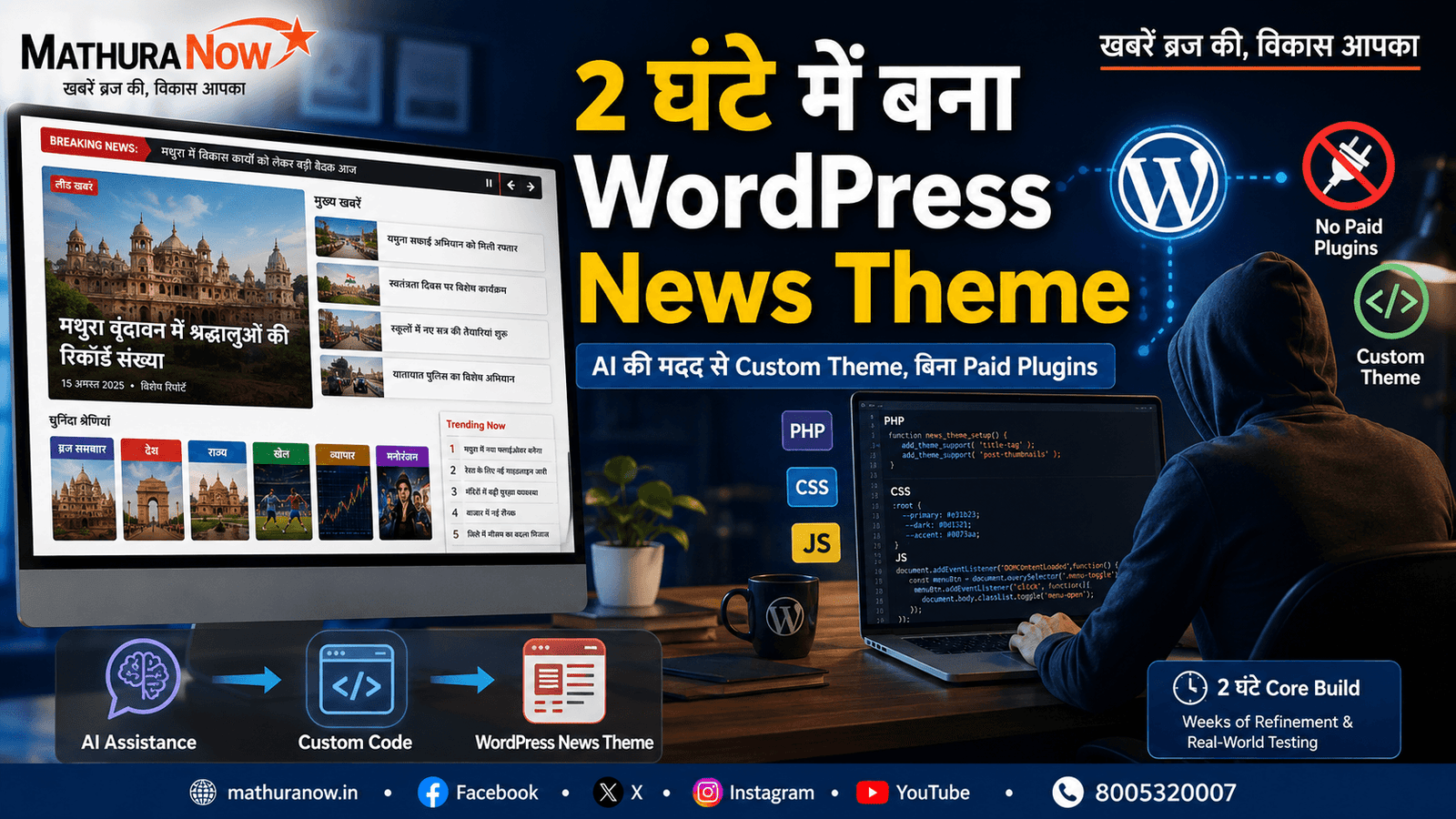
MATHURA, INDIA: I built a full-featured WordPress news theme from scratch in about two hours of focused, AI-assisted development time. The total project cost stayed under ₹5,000 because the domain and hosting were already in place, and I did not buy a premium theme or any paid plugin subscriptions.
That sounds faster than it really was, so here is the important qualification: the core theme was built in roughly two focused hours. Using it on a real, live bilingual news website exposed bugs, edge cases and new requirements over the following weeks. Those were fixed and refined over time. The theme was not magically “finished forever” in two hours.
Also Read: UP Government’s Farmer Chaupal Model Aims to Transform Indian Agriculture
The website is a live Hindi-English local news portal in Mathura, India. Instead of buying a theme and then adding eight or ten plugins for features such as author profiles, trending stories, social sharing, internal links, advertisements and custom SEO, I built those functions directly into the WordPress theme.
Why I Chose a Custom WordPress Theme Instead of Plugins
The goal was not to avoid plugins simply because plugins are bad. Good plugins are extremely useful. The goal was to reduce the number of separate systems doing small jobs on a news website.
A custom theme gives me more control over exactly what loads on the page. It also reduces the number of plugin conflicts that can appear after WordPress, a theme or a plugin is updated. There are fewer recurring licence costs and fewer independent components to maintain.
Also Read: Smart Phones: A Modern Convenience or a Growing Social and Mental Concern?
The trade-off is real. Building functionality into a theme requires more upfront development work. Future changes also require someone who can understand WordPress, PHP and the theme’s code. A drag-and-drop website is easier for a non-technical user to modify.
For this particular news site, the control was worth the extra development effort.
1. Homepage Layout: Built for a Newsroom, Not a Blog
The homepage does not simply display one large image followed by a list of posts. The lead section uses a lead story plus secondary list layout. One main story receives the strongest visual position, while up to four smaller stories appear alongside it.
Below that, individual categories get their own horizontal content rails. Each rail contains a row of article cards, making it possible for a reader to move from one topic to another without scrolling through one endless mixed feed.
The category rails also have their own accent colours. Those colours come from a fixed palette linked to the category ID, so the same category keeps a consistent visual identity across the site.
A breaking-news ticker provides another newsroom-style element. It can be paused by the reader rather than forcing a moving headline to continue indefinitely. The sidebar contains a native Trending Now widget.
Also Read: India Census 2027: House Listing and Self-Enumeration Process Begins Across Uttar Pradesh
Developer note: The layout is rendered with native WordPress queries and theme templates, while category IDs are mapped to a fixed accent-colour palette and the ticker uses lightweight theme JavaScript.
2. Native Author System Replaces a Premium Author Plugin
Author information is part of the theme rather than a separate author-box plugin. From the normal WordPress user profile screen, an author can have an avatar, Facebook, X and Instagram links, plus a biography.
The theme also supports multiple authors on an article. Instead of installing a large co-author plugin that creates another taxonomy system, the article editor has a simple custom field and meta box where additional authors can be assigned.
Author archive pages are generated automatically. This gives readers a useful way to find other articles written by the same person.
The author information also feeds the site’s SEO structured data. Structured data is machine-readable information that helps search engines understand what a page represents, including the relationship between an article and its author.
Developer note: Author profile data is stored in user meta, co-authors are assigned through post meta, author archives use native WordPress rewrite/query handling, and the theme feeds author entities into Person/Article structured data.
3. Native Trending Now Widget
“Trending” should mean something measurable. On this site, the native Trending Now widget ranks articles using comment activity from the previous 30 days.
If there is not enough recent comment activity, the system falls back to recent posts. That means the sidebar does not suddenly become empty simply because a website has a quiet day.
The result is also cached for 15 minutes. Caching means temporarily storing a result so WordPress does not have to perform the same database work on every page request.
Developer note: The widget uses a date-limited comment-based query with a latest-post fallback and a 15-minute WordPress cache to reduce repeated database queries.
4. “Also Read” Internal Linking Without a Plugin
Internal linking means connecting one article on a website to another article on the same website. It helps readers discover more information and gives search engines additional context about the site’s content structure.
The theme automatically inserts an Also Read recommendation after the second paragraph of an article. The recommendation normally comes from the same category.
There is an important detail here: the selection is not random. The system uses a deterministic hash based on the post ID. In simple terms, the same article produces the same selection rather than changing recommendations on every page refresh.
The selection also reaches beyond only the four newest articles. This gives older articles a chance to receive internal links instead of leaving them buried in the archive.
An editor can override the automatic recommendation from the post editor when there is a more useful story to link to.
Developer note: A deterministic post-ID hash selects a same-category candidate from the eligible post set, with post-meta override support for manual editorial control.
5. Native Social Share Bar
The theme includes its own sharing system for WhatsApp, Facebook, X and Copy Link. Full sharing controls appear on individual articles, while card grids use a smaller icon-only version.
There is no jQuery dependency and no external sharing library. Copy Link uses the browser’s native clipboard functionality through vanilla JavaScript.
This keeps a simple feature simple. There is no need to load a large third-party library just to copy a URL or construct a social sharing link.
Developer note: Social URLs are generated server-side where appropriate, while clipboard copying uses the browser Clipboard API through vanilla JavaScript.
6. A Weather-Reactive News Website
This is probably the most unusual feature in the theme.
The website can pull current weather information for its city from a free weather API. An API, or application programming interface, is a way for one system to request information from another system.
The weather data is not just displayed as text. The site’s visual theme reacts to the current conditions and whether it is day or night. The header and footer can change their visual treatment with animated gradients and subtle sun, moon, rain and cloud effects.
The header also contains a compact weather indicator such as City · ☁️ 28°C · 15 Aug.
This is decorative rather than essential functionality, but it gives the local news site a stronger sense of place.
Developer note: Current weather and day/night state are consumed from a weather API and mapped to theme classes that control CSS gradients, atmospheric effects and the compact header widget.
7. WordPress Customizer Controls
Many themes require a separate plugin for basic visual controls. This theme uses WordPress’s native Customizer, the built-in screen for changing supported theme settings.
It includes separate logo size and position controls for desktop and mobile. That matters because a logo that looks correct on a large screen can become too large or badly positioned on a phone.
Accent colours can also be changed through the Customizer. Link and tag colours are generated into the site’s CSS automatically.
Social media links and the breaking-news ticker can also be controlled without editing the theme files.
Developer note: Settings are registered through the WordPress Customizer API, with saved values exposed as generated CSS and theme configuration variables.
8. SEO Integration Beyond the Basic Plugin Setup
The theme works alongside the free tier of an SEO plugin rather than trying to replace the entire SEO system.
It adds functionality that was useful for this particular site, including breadcrumbs, Speakable structured data and custom per-post SEO fields.
Breadcrumbs show the reader where an article sits within the site’s hierarchy. Speakable markup provides machine-readable information identifying content that may be suitable for spoken presentation. The custom fields allow the editor to control the SEO title, description and focus keyword for an individual article.
The important principle is separation of responsibilities. The SEO plugin handles its own core functions, while the theme adds the specific features required by the site’s editorial workflow.
Developer note: Breadcrumb output, Speakable structured-data markup and post-level SEO meta fields are generated through native WordPress hooks and template functions alongside the site’s SEO plugin.
9. An AdSense-Ready Advertising System
Advertising was another area where I did not want to install a dedicated ad-management plugin.
The theme reserves five fixed advertising positions: header, after-title, mid-article, end-of-article and sidebar.
The important design decision is what happens when no advertisement has been connected yet. The empty slot does not display a fake box or an unnecessary “Advertisement” label. It remains invisible.
This keeps the page clean while the site is being prepared for advertising-network review. When a real advertisement is connected, the reserved container is ready to hold it.
The layout is designed with reserved space in mind so that advertising can be introduced without unnecessarily shifting the surrounding content. The system is also compatible with Google AdSense Auto ads.
Developer note: Fixed theme ad hooks provide reserved containers at five locations, with conditional rendering and layout-safe dimensions so empty slots produce no visible placeholder.
10. Performance Engineering: The Less Obvious Work
Performance is not one setting. It is the result of many small decisions.
The theme uses self-hosted variable fonts. A variable font can contain multiple font weights inside one font file, reducing the need to load four or six separate files.
Images are handled differently depending on where they appear. Grid thumbnails are cropped into consistent shapes so the homepage does not become visually uneven. Full article hero images are displayed without aggressive cropping.
That second decision came from a real mistake. A carefully designed banner image had important branding near the edge, and an automatic crop removed part of it. The image handling was changed so article hero images could preserve their complete composition.
The theme also had to work carefully with the hosting-level cache system. Cache-busting was needed when CSS or JavaScript changed. An aggressive “unused CSS” optimisation feature was also found to be removing CSS rules that were actually required by the theme.
There is no jQuery, no Node.js build pipeline, no webpack and no separate compilation process. The theme uses PHP, vanilla JavaScript and one main hand-written CSS file.
Developer note: Performance relies on self-hosted variable fonts, context-specific image sizing, cache-aware asset versioning, one primary CSS file and one JavaScript file with zero jQuery or build-step dependencies.
11. Multilingual Hindi-English Publishing
The website is bilingual. Its main audience reads Hindi, while an English version is also available.
The theme works with the free machine-translation tier of a translation plugin for automatic Hindi-English publishing. The theme itself does not attempt to become a translation engine.
A floating language switcher lets readers move between languages. Its position was deliberately adjusted so that it does not cover important article content or interfere with normal mobile navigation.
Developer note: The theme remains translation-plugin compatible, while the floating language-switcher container is positioned through theme CSS with mobile-safe spacing.
12. A Branded Email System Without a Newsletter Plugin
News websites often need email notifications when an author publishes an article. Instead of relying on a large newsletter plugin, the theme has a reusable HTML email template.
The template has a consistent header, article body and footer. Social icons are generated dynamically, so changing the site’s social-media links does not require manually rebuilding every email template.
There is another part that is less visible but more important: sender authentication.
SPF, DKIM and DMARC are email authentication systems. They help receiving email providers verify that messages really came from an authorised sender and reduce the chance of legitimate mail being treated as spam.
Developer note: The theme uses a reusable HTML notification template with dynamic social metadata, while domain-level SPF, DKIM and DMARC records establish authenticated sender identity.
13. AI-Assisted Content Tools: Useful, but Currently Paused
The most ambitious part of the project was a custom AI integration for the newsroom. It is currently paused because of a billing and account-access issue. I am including that detail because it is one of the most useful lessons from the project.
The first tool can take rough reporting notes, a press release or field notes and turn them into a structured news draft. The output can include a headline, SEO fields, category, tags and the article body.
But the AI does not publish anything automatically. It creates a WordPress draft. A human editor must review it and click Publish. That rule is deliberate.
The second feature handles real photographs. Instead of generating a fictional news image, the system takes the editor’s original uploaded photograph and adds the MathuraNow logo, headline banner and footer branding around it. The underlying photograph remains the real source image.
There is also an AI-assisted maintenance tool for the site owner. It can read error logs, identify possible problems and suggest fixes. The owner still has to approve changes manually.
The billing problem produced an important lesson. A consumer AI subscription such as Gemini Pro, ChatGPT Plus or Claude Pro does not automatically provide developer API access. An API is the developer-facing connection used by software to communicate with an AI service. It is normally billed and managed separately.
There can also be account-level complications. In this project, changing the Google account behind an AI API setup to a Google Workspace business account affected API access. The practical lesson is simple: keep a dedicated account for developer API credentials and understand exactly which billing account is attached before changing account types.
Developer note: The integration uses server-side API communication, structured prompt/output handling, WordPress draft creation and human approval gates; API credentials are kept server-side and the AI integration is currently disabled pending the billing/account decision.
What the Build Actually Cost
The headline says under ₹5,000, but that number needs context.
The domain and hosting were already owned, so the build did not require buying a new domain or a premium hosting package. There was no premium WordPress theme purchase and no paid plugin subscription for the features described above.
The two-hour figure refers to the focused AI-assisted core theme build. It does not mean two hours covered every bug, design adjustment and production problem that appeared afterward.
Real-world use exposed several issues. One carefully designed featured image was cropped badly, removing part of its branding. An advertising slot initially displayed a visible placeholder label even when no advertisement was connected, which created unnecessary clutter. Cache optimisation also removed CSS rules that the theme actually needed.
Those are not failures of the overall approach. They are the normal difference between writing code that looks correct and running that code on a real website with real content, real images, caching and mobile users.
Should You Build Your Own WordPress Theme?
If you want a completely no-code website that you can modify forever with drag-and-drop controls, this approach is probably not for you.
If you run a serious content website and want complete control over performance, layout and editorial functionality, a custom theme can make sense. It is especially attractive when several small plugin functions can be replaced by focused native code.
You do not need to become a professional WordPress developer. But you should either be comfortable reading basic theme code or have access to someone who can make safe PHP, CSS and JavaScript changes when required.
The biggest lesson from this project is not that WordPress themes can be built in two hours. It is that a focused theme can be designed around the exact workflow of a newsroom instead of forcing the newsroom to adapt to a collection of unrelated plugins.
The two-hour build proved that the core is achievable. The weeks that followed proved something equally important: shipping the first version is only the beginning. A real website is the test.
Your first comment on any article never needs an account. If an author replies and you want to keep the conversation going, a free account keeps things trustworthy. Log in or sign up.